



Ergonomics: How the Right Stand Can Help Reduce Back Pain
With the growing adoption of remote work, ergonomics has become increasingly important. Thanks to ergonomic practices, many people are adopting new habits to help prevent back pain and discomfort caused by poor posture. In this article, we explain what ergonomics is and how it can help reduce discomfort through healthier habits, such as choosing the right laptop stand. Check it out!
What is ergonomics?
The word “ergonomics” comes from two Greek words: ergon (work) and nomos (rules). In other words, ergonomics is a concept that studies the relationship between people, machines, equipment, and working conditions.
As work-related health issues became more common, standards and practices were adopted to provide greater comfort while performing daily tasks. These practices are designed to help reduce and prevent occupational health problems.
What are the types of ergonomics?
Physical ergonomics
Physical ergonomics studies the relationship between human anatomy and the work environment. In other words, it focuses on understanding how the human body adapts to the conditions it is exposed to. This includes workplace posture, reducing repetitive movements, and adapting the environment to each person’s individual needs and physical characteristics.
Organizational ergonomics
Organizational ergonomics is related to workplace culture, environment, values, and organizational policies, as well as how these factors may affect work. It considers aspects such as encouraging teamwork, improving communication processes, implementing participatory projects, and managing working hours. That scheduled break to rest and have a cup of coffee? That’s part of it.
Cognitive ergonomics
Cognitive ergonomics focuses on understanding how different tasks directly affect factors such as human reliability, decision-making, human-machine interaction, occupational stress, and mental workload.
Corrective ergonomics
Corrective ergonomics involves adapting the work environment to employees’ needs. It is the company’s responsibility to make the necessary adjustments to provide a functional and suitable environment for performing tasks while helping reduce pain and discomfort.
Ergonomic awareness
This approach focuses on employee engagement with their own well-being. It involves helping each worker understand the importance of ergonomics and the impact of applying ergonomic practices.
Participatory ergonomics
Participatory ergonomics was developed to raise awareness and help ensure that ergonomic practices are actually being implemented.
Operational ergonomics
Operational ergonomics seeks to minimize employee overload by developing the structures needed to improve team performance while maintaining work quality as demand increases.
Ergonomics When Working from Home
If ergonomics is already a challenge in corporate environments, imagine implementing it at home. To create healthier habits, it is important to adapt your workspace to your individual needs. Office chairs, stands, and equipment that support better posture, along with health and wellness programs, training, and ergonomic awareness, can all contribute to a more comfortable workspace.
Height Adjustment
This laptop stand features height and size adjustments to adapt to your needs and provide greater comfort while you work.
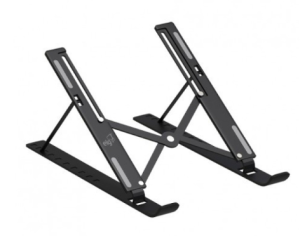
The perfect accessory for anyone who needs to use a laptop on a stand with adjustable arms, helping make laptop use more comfortable and ergonomic. You can find this product by clicking here.
Practical and easy to use, it comes fully assembled and is portable. It features 10 height levels and position adjustment for greater comfort and ergonomics while working, studying, or enjoying your free time. Help minimize neck and eye discomfort.
Organizer
Here, you can find stands that help keep your workstation organized.
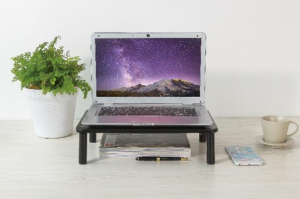
More organization, comfort, and ergonomics. This desk organizer stand features three height adjustment levels (3.9 in, 4.7 in, or 5.5 in), helping reduce back and neck discomfort. It also gives you more desk space, as it supports up to two monitors and features two trays—one for a keyboard and mouse and another additional tray. Learn more about this organizer by clicking here.
What did you think of these tips? You can start adopting new ergonomic practices at home and promote greater comfort and well-being throughout your day.


Compare
Contact


Where we are
- •8300 Dona Francisca St. - Distrito Industrial, Joinville - SC, 89219-600, Brazil
- •1885 SW 31st Avenue, Hallandale Beach, FL 33009, United States
- •87 Wing Lok St, Sheung Wan, Hong Kong
Social Media


 Business Quote
  Contact ELG
  Products